IRC, with a little less clutter.
A modern IRC client that connects to your favourite networks, keeps every conversation in one place, and runs in less memory than a single browser tab.
One .exe, no installer. Updates itself from GitHub.
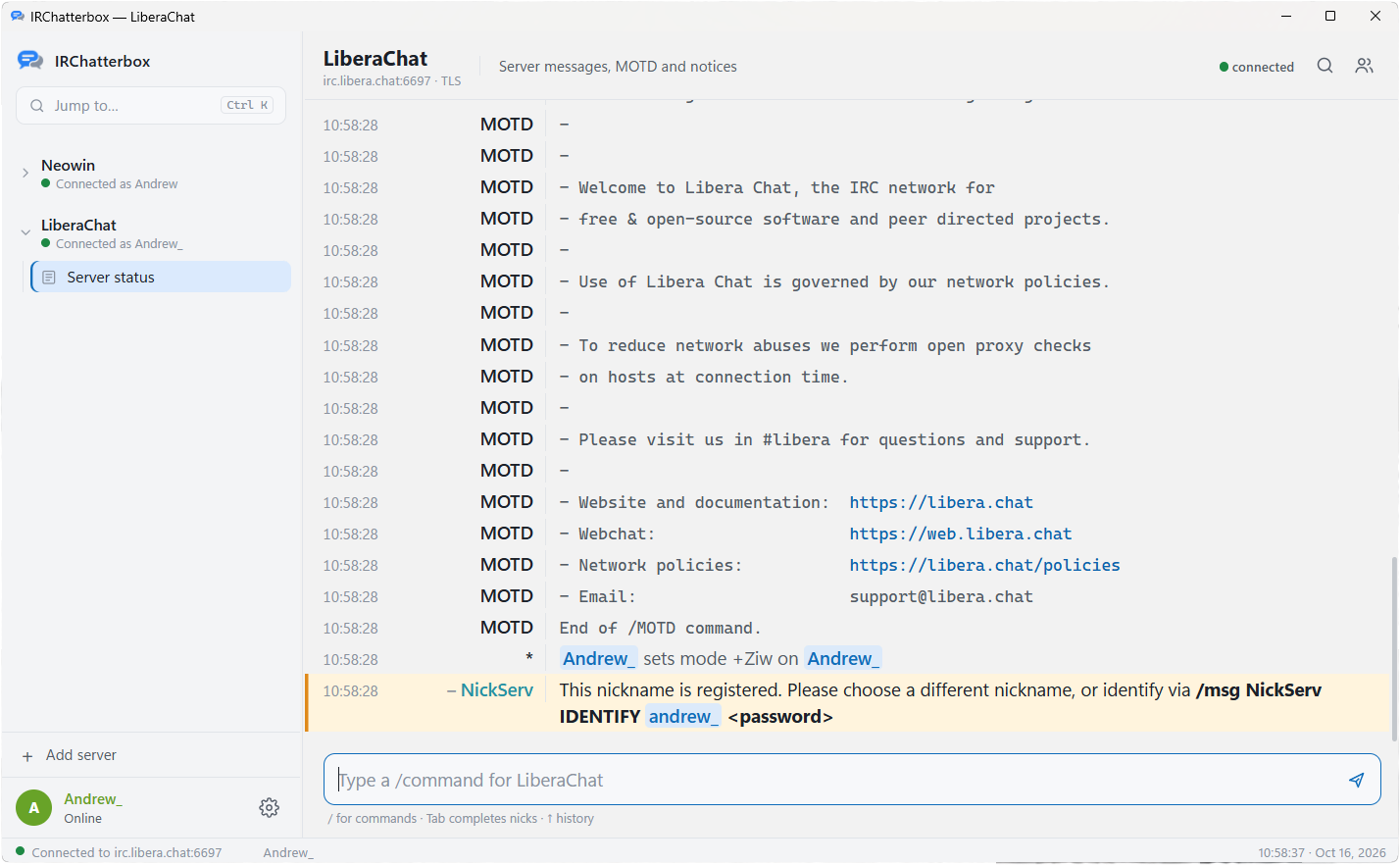
Everything you expect from IRC. None of the fiddling.
Every IRC command works. The rest is there to make long sessions comfortable.
Mentions you won't miss
Your nick and highlight words get a coloured line, a red badge and a Windows toast. Tray and taskbar flash, with custom sounds.
Inline media
Images, GIFs, video and audio play right in the chat, along with YouTube, Vimeo, Streamable and Spotify previews.
Bouncer support
Connect through soju or ZNC to stay online 24/7. Catch up on what you missed and keep read status in sync with your phone.
Split view
Watch two channels side by side or four in a grid. Drag a channel onto a pane, and F6 hops between them.
Saved servers, auto-login
SASL or NickServ, connect on startup, auto-join channels with keys, and reconnect with backoff when the line drops.
Nick colours that stick
Automatic and stable, so Andrew and Andrew|away match. Override any nick and it stays readable.
Built for the keyboard
Ctrl+K channel switcher, tab completion, input history, Alt+A to the next unread, and mIRC colours and formatting.
Emoji and shortcuts
An offline emoji picker on Ctrl+E, and text shortcuts: type $shrug and send ¯\_(ツ)_/¯.
History and logs
Recent history reloads per channel, with optional plain-text .txt logs. A marker line shows where you left off.
Older networks welcome
Per-server text encoding: UTF-8 with a Western fallback, or Cyrillic, Japanese, Chinese, Korean, Greek, Turkish and more.
Safe by design
IRC text never runs as HTML, a strict Content Security Policy, paste protection, and every release is security-scanned.
Updates itself
New releases install with one click. Each download is checked against its SHA-256 sum before the app restarts.
Under 15 MB of RAM.
IRChatterbox is written in Go and uses the WebView2 engine that already ships with Windows 10 and 11, rather than bundling a full copy of Chromium. Leave it open all day across several networks and you won't notice it's there.
[Measured on WINDOWS VERSION, N servers, N channels.]
26 themes. Some of them very 1998.
Follows Windows light and dark mode live. Pick from popular palettes, a few throwbacks, or build your own in the theme editor.
Also: Dark, Light, Midnight, Classic, One Dark, Monokai, Gruvbox, Solarized, GitHub, Rosé Pine, Everforest, High Contrast and amber CRT.
Bots and plugins, built in.
A temperature converter and a !music now-playing bot come ready to go. Point a trigger at any URL to make your own commands, or drop JavaScript plugins into a folder to react to messages, joins, kicks and topics.
Same client, in your pocket.
The Android app shares the same core and the same look. Pair it with a bouncer and your read status follows you between desktop and phone.
Questions
Do I need to install anything?
No. Download IRChatterbox.exe and double-click it. It uses WebView2, which already comes with Windows 10 and 11.
Which networks does it work with?
Any IRC network: Libera.Chat, OFTC, EFnet and the rest. Older networks can use their own text encoding per server.
How do I stay online when my PC is off?
Connect through a bouncer like soju or ZNC. You'll get what you missed when you reconnect, plus one "while you were away" summary instead of a pile of notifications. Setting up soju
How does it update?
The app checks GitHub for new releases and installs them with one click. Each download is verified against its SHA-256 sum before it's swapped in.
Is it safe to open links and images?
IRC text is never rendered as HTML, the app runs under a strict Content Security Policy, and every release passes dependency and code scanning first. Each media type can be switched off in Settings.
Ready to /connect?
Under 15 MB of RAM, one file, and every channel in one place.